
Guide: selecting Moja eFaktúra on the Financial Administration portal
Companies choose their digital postman in the Financial Administration application at vpds.financnasprava.sk. Moja eFaktúra is listed there under the business name of its operator, Digital Orchestra, s.r.o., an intermediary of the certified provider Verteco digital services, s.r.o. The selection is neither a contract nor binding. The application is in Slovak; we give its labels with an English translation in brackets.
You will need:
- a Financial Administration portal account, with sign-in through slovensko.sk (eID, the mobile key or a residence card with a chip) or with an identifier and password; if you have none, register first;
- the right to act for the company (an authorisation or representation); the company must have a tax ID (DIČ);
- an e-mail address and phone number where we can reach you about the contract.
1. Find Digital Orchestra in the list and click Výber
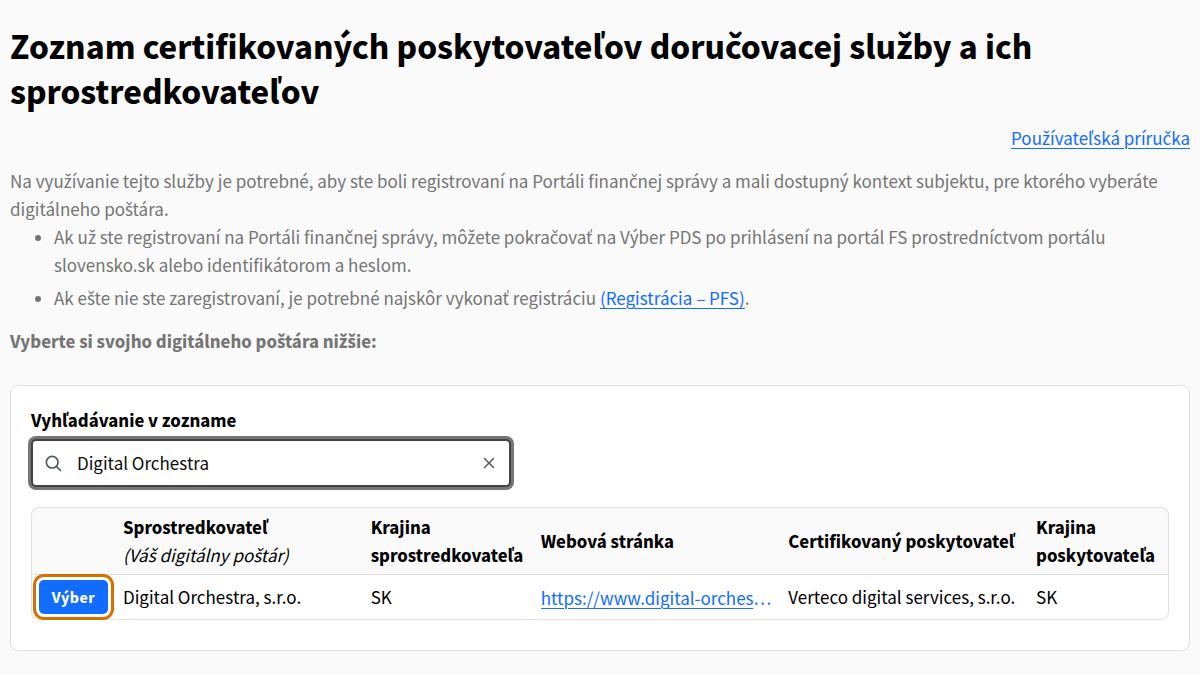
Open vpds.financnasprava.sk. Anyone can view the list without signing in. Type ‘Digital Orchestra’ into the Vyhľadávanie v zozname (Search the list) field. A row appears with the intermediary Digital Orchestra, s.r.o. and the certified provider Verteco digital services, s.r.o. Beware of similar names: the list also includes eFaktura s.r.o. and other providers with eFaktúra in their name. In the Digital Orchestra row, click Výber (Select).
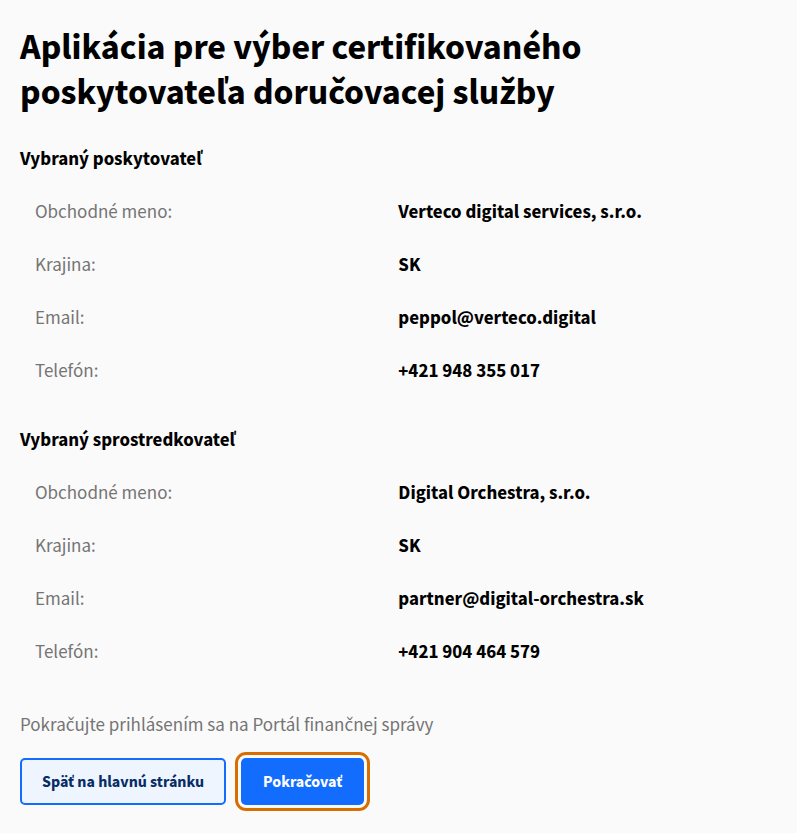
A detail page opens with the selected provider and intermediary. Check that the intermediary is Digital Orchestra, s.r.o. and click Pokračovať (Continue). The button at the end of this guide leads straight here.
2. Sign in to the Financial Administration portal
Sign in through slovensko.sk or with your FS portal identifier and password. On first use, the Potvrdenie prístupu (Access confirmation) screen asks for access to your identification and your list of tax subjects. Confirm it.
3. Choose your company
The Výber daňového subjektu (Choice of tax subject) step lists only the subjects you act for under an authorisation or representation. Choose the company you want Moja eFaktúra for; it must have a tax ID (DIČ).
4. Enter the contact details
In the Kontaktné údaje daňového subjektu (Contact details of the tax subject) step, both e-mail and phone are required. We will use them to contact you about the contract, so give details you check regularly.
5. Allow your data to be shared
In the Povolenie pre poskytnutie údajov subjektu (Permission to provide the subject’s data) step, click Povoliť (Allow).
6. Check the summary and send the data
In the Odoslanie údajov subjektu (Sending the subject’s data) step, check the summary and click Pokračovať (Continue). If you have already made a selection for the company, a duplicate selection warning appears; you can still continue.
7. Confirmation of sending
The application shows Potvrdenie odoslania (Confirmation of sending). Your selection is complete.
What happens next
- A message with verification details arrives in your company’s mailbox in the personal internet zone (OIZ) of the FS portal.
- We receive your selection automatically.
- We create your account and an invitation to the client zone arrives at the e-mail from your selection. After signing in, accepting our Terms and Conditions activates your company in the Peppol network.
- We will then inform you of the activation by e-mail.
If something goes wrong
Your company does not appear after signing in
You need an FS portal authorisation for the company, for example as its director or as an accountant with a power of attorney. Request it in the OIZ under Autorizácie → Žiadosť o autorizáciu (Authorisations → Authorisation request); the Financial Administration usually processes it within 3 working days. See the Financial Administration’s e-invoicing information (in Slovak).
The direct link to our entry does not work
Open vpds.financnasprava.sk and search for ‘Digital Orchestra’ as in step 1.
Another provider has registered your company in the Peppol network
If your company is already registered with another provider in the Peppol network (an SMP record), we take over the registration with a migration code from your current provider. If unsure, get in touch.
Need help?
E-mail partner@digital-orchestra.sk or call +421 904 464 579 on working days from 9:00 to 16:00. We will gladly guide you through the selection.